Nginx Never Saw It
21 Oct 2026 · 2 min de lectura · patillacode
I spent an hour hardening my reverse proxy.
Then I read my router's port list.
It started with a Telegram message from a friend who does security for a living: a link and a line that translated to "just in case you run Plex".
Another link was Plex2Shell, explaining more in detail the chain of five bugs that lets a stranger run code on a Plex server without logging in.
Already being used to drop crypto miners on other people's boxes. The only requirement is that port 32400 can be reached.
Mine could. My friends and family stream from it, that's the whole point!
The part where I feel competent
Plex was one patch behind, so I updated it.
Then I went looking for signs that someone had already been inside: strange processes, a clean /tmp, codec libraries all dated from the install, no weird transcoder settings, nothing nasty in the logs.
Clean.
The internet had mostly been asking my Plex for WordPress admin pages and getting 404s, which is the correct answer.
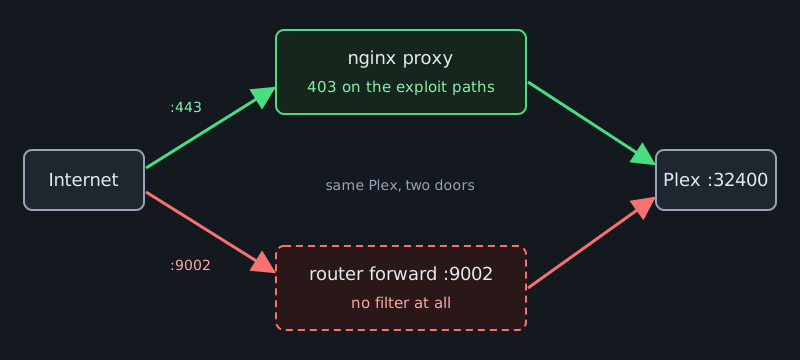
The exploit chain starts on two paths that real Plex apps never use through a proxy, so I told nginx to refuse them:
location ^~ /player/ { return 403; }
location ^~ /system/agents/ { return 403; }

location ^~ /:/prefs {
    limit_except GET { allow 10.10.1.0/24; deny all; }
    include conf.d/include/proxy.conf;
}
The last block is the end of the chain: changing a transcoder setting needs a write to prefs, and now only my LAN can write.
I felt smug for about four minutes.
The side door
Then I read the router's port forwarding list.
One line: external port 9002 to Plex's 32400.
Plex's own Remote Access feature wanted that at some point and I'd forgotten it existed.
That door goes straight to Plex. My shiny nginx 403s never see a single packet of it.
So the plan was simple: tell Plex to advertise https://plex.patilla.es through its custom server URL, close the forward, and everybody ends up behind the proxy.
I closed the port, switched Remote Access off, grabbed my phone, turned off wifi and opened Plex.
Plex's own content: check.
My library: nowhere.
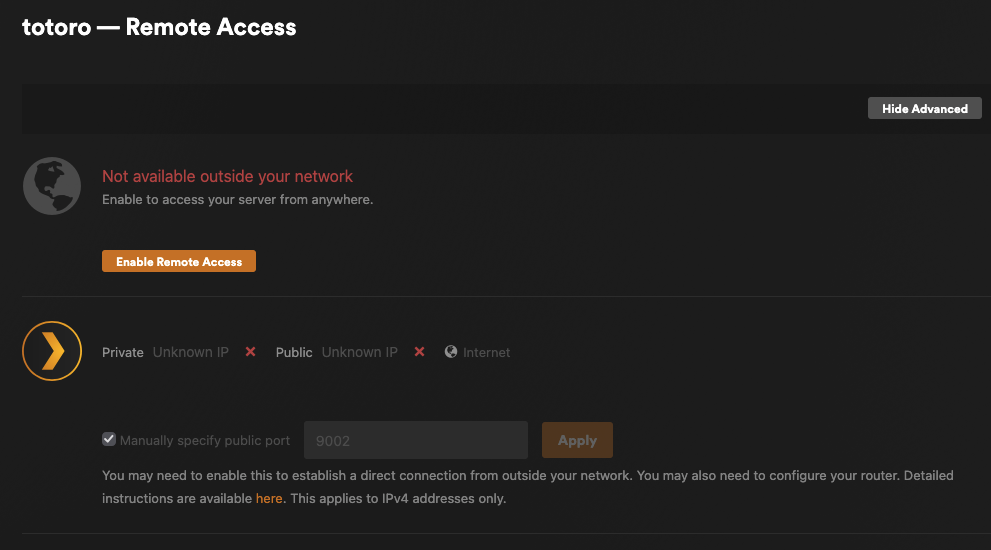
Fair enough, I had just made that true, DUH!
With Remote Access off, plex.tv stops telling clients where your server lives, and the custom URL on its own doesn't bring them back.
For a few minutes my friends were locked out and nobody knew yet.
The fix was to switch Remote Access back on, untick the manual port, and leave the custom URL alone.
The page still shows a scary red unreachable because the old port is closed, and everything works.
A friend streamed from their laptop with their own account, then from their TV logged in as my managed profile.
A real human on a real network, which beats any curl I could run from my couch.
Weather report
For scale, fail2ban on the same server says it has seen 68552 failed login attempts and banned 4845 IPs.
That isn't an attack, that's just the weather when you run an exposed box.
Patch the CVE, block the paths, then go read your router's port list. It has opinions.